Guides › Radio, community & protection · Emergency · Index A–Z
Using a Radio: Button by Button
A radio nobody can work is no better than no radio. This guide is about the equipment: which knob does what, how to put a channel in, what squelch is, what a "privacy code" really does, how to work a repeater, and how to fill a radio with channels from a computer while there is still internet. It assumes you have never used a radio.
The rest is in two other guides: which service to use, licences, antennas, range and how to call for help in the Emergency radio guide; texting radio to radio in the Mesh radio guide.
The books behind it are in Southern-Oregon\Comms-Signals\Radio-Operating: the federal fire crews' own radio course (NIRSC training), the DHS field guide with its tone tables, and the FCC's rules (Part 95, Part 97); the Army's FM 24-18 is in Southern-Oregon\Electronics-Repair\. Button-by-button detail is in no book here; those lines say (rule of thumb).
The short version
- Antenna on before you ever press transmit. "Never operate the transmitter without the antenna attached" (FM 24-18, p. 111).
- Every radio has the same six controls: on/off and volume, squelch, channel or frequency, the transmit button, power level, and the antenna.
- Squelch is the hiss gate. Too tight and you hear nothing — including the weak call you were waiting for (NIRSC, p. 24).
- A "privacy code" makes nothing private. It only keeps your own speaker quiet.
- Do the computer part now, while there is internet: the free CHIRP program, a cable you have tested, your channels in every radio, and a printed card.
- Save your own radio's manual onto the drive. Models differ, and no general guide can give you your radio's menu numbers.
1. Every radio has the same six controls
A $25 handheld, a ham base station, a truck CB and a weather radio all have the same six things. Makers hide them in different places, but there are only six.
| Control | What it does | What goes wrong |
|---|---|---|
| On/off and volume | Power, and how loud the speaker is | Volume set in silence, so you can't tell it is working |
| Squelch | Cuts the hiss when nobody is talking | Too tight: silence, even when someone calls. Too loose: hiss all day |
| Channel or frequency | Which conversation you are on | Both radios must be on the same one, set the same way |
| Transmit (the PTT) | Hold to talk, let go to listen | You are deaf while you hold it; the first word is often cut off |
| Power: high or low | How hard it shouts | High power on a weak battery; low power when you need range |
| The antenna | The radio's voice and its ears | Transmitting with none on, a loose connector, holding it flat |
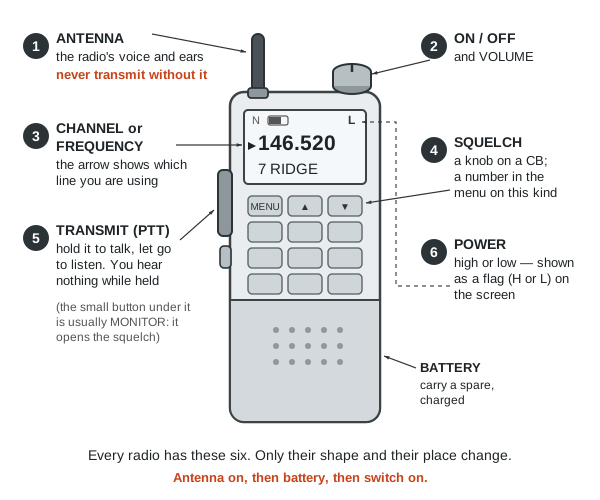 The six controls, drawn generically: every radio has these, wherever the maker put them (a diagram drawn for this guide).
On/off and volume
Switch on with the antenna already fitted. Set the volume against noise, not silence: open the squelch until you hear hiss, set the volume on that hiss, then close the squelch again (NIRSC, p. 25). A radio set in silence is usually far too quiet, and you find out when a call goes unheard. For a weak signal an earphone beats the speaker (FM 24-18, p. 112) — keep one with the radio.
Squelch: the control nobody explains
A receiver with nothing to receive is at its most sensitive, so it amplifies the hiss of empty air and "you will hear noise greatly amplified" (NEETS 17, p. 72). Squelch is a gate that keeps the speaker shut until a signal worth hearing arrives. Open it (turn it down) and you get hiss and every faint signal; close it (turn it up) and the hiss goes — but "if adjusted too tightly, valid signals may not be strong enough to open the squelch" (NIRSC, p. 24).
- Set it like this: open until you hear hiss, set the volume, then close it just far enough that the hiss stops and no further — threshold squelch (NIRSC, p. 25).
- Open it on purpose when straining for a distant station: "open squelch can be used to hear a very weak signal" (p. 17). Many radios have a monitor button that opens it while held.
- Power lines and fluorescent lights can open the squelch by themselves (p. 24), and so can a generator or charger nearby (FM 24-18, p. 103).
On a cheap handheld the squelch is a number in the menu, 0 (wide open) to 9 (tightest); the middle suits most places (rule of thumb). On a CB it is a knob.
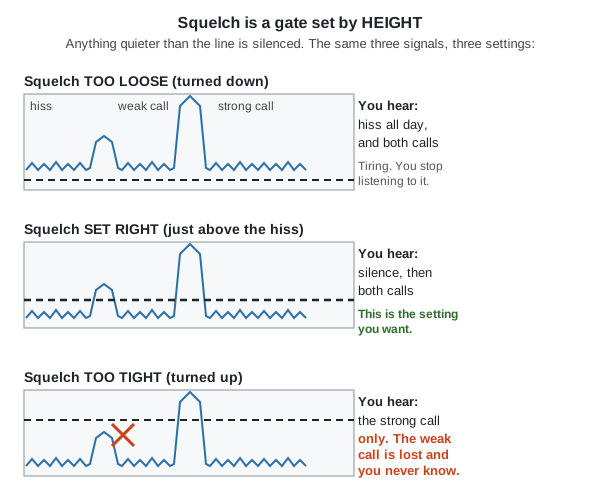 Squelch is a gate set by height: anything quieter than the line is silenced. Set it just above the hiss and no higher (a diagram drawn for this guide).
Channel or frequency
Two radios hear each other only if they are "powered on and operating on the same channel" (NIRSC, p. 37). A channel is a number somebody already attached to a frequency — CB channel 19, FRS channel 3, memory channel 7 on your handheld — and is easy to say on the air and write on a card. A frequency is the number itself: FRS channel 3 is 462.6125 MHz (§95.577).
Many radios have two modes: frequency mode, where you type numbers, and channel (memory) mode, where you turn through what you saved. In memory mode you usually cannot type a frequency at all — the commonest "my radio is broken" moment (rule of thumb). Matching also means tone (section 3) and bandwidth (section 2).
The transmit button (the PTT)
PTT means push-to-talk: hold it to talk, let go to listen. One person talks at a time, and you hear nothing while you hold it. The fire crews' drill works on any radio (NIRSC, p. 40):
- Listen first, and know what you are going to say — "PTT stands for push-to-talk, not push-to-think".
- Press, pause, then speak, or the first word is lost.
- Microphone a few inches from your mouth, radio upright, speaking "slowly and distinctly" in a normal voice (also FM 24-18, p. 112). Say who you want, then who you are: "Base, this is Mary."
- Let go and wait 10 to 15 seconds before calling again. On a long message unkey every minute or two, say "break", and carry on, because many radios cut you off (p. 41).
Plain English, not ten-codes (same page). Distress calls and message forms are in the Radio guide.
Power: high or low
Low power saves the battery and still works close by; high power is for reaching out. "The range of a transmitter is proportional to the power radiated by its antenna" (FM 24-18, p. 105), but height beats watts (Radio guide). The FCC's rule for the licence-free radios is to use the least power that does the job, except that for emergency messages you may use "the highest transmitting power available" (§95.367).
⚠️ Never turn power down by mistuning the radio: "operation with a detuned power output stage can cause damage to the transmitter" (FM 24-18, p. 105).
The antenna
- ☠️ Never transmit without the antenna on (FM 24-18, p. 111). The power comes back down the line, where reflected power "can be responsible for ... even cause circuit damage" (p. 56). Make it a habit: antenna, battery, switch on.
- Hold it upright and clear of your body (NIRSC, p. 37). Inside a vehicle a handheld is nearly deaf and mute — "most of its signal will be blocked" by the metal body, so use an outside magnet-mount antenna (same page).
- Keep the connector clean and finger-tight. A corroded connector loses more than a poor antenna does (rule of thumb).
- ⚠️ Transmitter off before touching an antenna: "serious injury or death can result from contact with the radiating antenna of a medium- or high-power transmitter" (FM 24-18, p. 56).
2. A cheap handheld, button by button
The $25 dual-band handheld — the Baofeng UV-5R and its many look-alikes — is the radio most people own. It covers the 2 metre and 70 cm ham bands and will tune across the FRS, GMRS, MURS and public-service frequencies too; read the law before transmitting on any of them.
⚠️ Models and firmware differ, and they differ a lot. Two radios with the same picture on the box can have different menu numbers, labels and key combinations. Nothing below gives a menu number, because no general guide can. Download your own radio's manual while there is internet, copy it onto the drive beside these guides, and print the menu list: "study the technical manuals for the equipment you are using" (FM 24-18, p. 113).
What you are looking at. Two lines on the display, because these radios watch two channels at once, with a small arrow showing which line the keys and the transmit button are using — the arrow being on the other line is behind nearly every "it won't transmit" (rule of thumb). A frequency means frequency mode; a channel number and name means memory mode. Small flags round the edge show the padlock, the battery, high or low power, N for narrow, and the tone setting. The keys are a menu key, arrows, an exit key, a keypad, a key that swaps the two lines and a key that switches frequency and memory mode. On the side is the long transmit bar with a monitor button under it; on top the antenna, the volume and on/off knob, and an earphone socket.
The menu. Press the menu key for a numbered list; arrows move, menu goes in and accepts, exit backs out. The names are short and cryptic, so what matters is knowing what each one is — your manual gives the numbers.
| Look for | What it is | Usually |
|---|---|---|
| Squelch level (often "SQL") | How tight the hiss gate is | Middle of the range (rule of thumb) |
| Transmit power (often "TXP") | High / low | Low near home, high to reach out |
| Bandwidth ("W/N", wide/narrow) | How much room the voice takes | Must match the other radio |
| Receive tone (an "R-" item) | Tone that must arrive before your speaker opens | Off |
| Transmit tone (a "T-" item) | Tone you send | Only when a repeater or group needs one |
| Offset size and direction | Repeater working (section 4) | 0 and direct |
| Memory save / store | Saves what you have set as a channel number | See below |
| Dual watch / dual standby | Watch both lines at once | On, unless the battery is short |
| Roger beep · voice prompt · key beeps | Noises | Off, once you have learned the radio |
| Busy channel lockout | Refuses to transmit over someone else | On, outside an emergency |
Locking the keypad. A radio in a pocket reprograms itself. Nearly all of these lock when you press and hold one key (often the one marked with a padlock or #), and the same press unlocks it; if the radio beeps and shows "locked", that is what happened (NIRSC, p. 33). Lock it whenever you carry it.
Putting a frequency in by hand. Get into frequency mode; check the arrow is on the line you want; type every digit with no decimal point (146.520 is 146520); set power, bandwidth and any tone; then listen before you ever press transmit. If the radio refuses the number, it is outside the band the radio was built for, or you are in memory mode. Nothing is broken.
Memory channels. A memory holds a frequency, its tone, its width, its power and a name, so you reach it with one knob in the dark instead of typing nine digits. Fill them now, with names you will understand in a panic — HOUSE, RIDGE, WX1, not CH7 (rule of thumb). Saving one is the fiddliest thing these radios do and your manual has the steps: on most you set everything up in frequency mode, then use the menu's save item, choose a channel number and accept. Check it afterwards in memory mode. It is far easier from a computer (section 5), and easiest of all is copying a radio that is already set up, as fire crews do — "better still, have your radio 'cloned' from a radio that has already been programmed" (NIRSC, p. 9).
Narrow or wide. Voice channels come in two widths: FRS is 12.5 kHz, narrow (§95.573), while the main GMRS channels are 20 kHz, wide (§95.1773); radio plans write N or W beside every frequency (ICS 205 instructions, p. 23) and above 138 MHz narrow is now the normal case (DHS field guide, p. 8). Get it wrong and the radio still works, it just sounds wrong: your voice arrives thin and quiet at a radio set wider than yours, loud and distorted at one set narrower (rule of thumb). If one person says you sound strange and nobody else does, check this.
Dual watch listens to both lines and stops on whichever speaks. It transmits on the line the arrow is on, not the one you just heard, so move the arrow before you answer; and watching extra channels "takes more power and drains batteries more quickly" (NIRSC, p. 18). The fire crews' rule is no more than three channels (p. 19).
The beeps. The roger beep is a short tone sent when you release the transmit button, which the rules allow ("brief tones to indicate the end of a transmission", §95.587); it helps on a noisy channel and irritates everywhere else. Voice prompts read the menu aloud: useful while you learn, a liability when you are hiding. Turn both off when you are done learning (rule of thumb).
Battery and charging. These charge in a drop-in cradle whose light changes colour when done; take the battery out then, and don't leave it on charge for weeks (rule of thumb). Don't charge a cold or hot battery: lithium cells should not be charged below 0 °C (32 °F) or above 45–50 °C (113–122 °F), and charging cold can wreck a cell outright (Li-ion overview, p. 7). Keep two batteries, one in the radio and one charged on the shelf (NIRSC, p. 39), and buy the AA battery tray made for your model now: they are model-specific, and a radio you can feed with any cells you find is worth having (rule of thumb).
The stock antenna is the weakest part. The short rubber antenna is made to be pocketable, not good. A longer whip, or a wire up in a tree, is the cheapest big improvement to any handheld (rule of thumb); height is what really matters (Radio guide).
3. Tones: CTCSS, DCS and the "privacy code" lie
A tone is a hum too low to hear — 67 to 250 hertz — sent underneath your voice the whole time you transmit (§95.377). Its one job is to open the other radio's speaker: the tones "act like a key; you need to use the correct key to activate the radio" (NIRSC, p. 22). It has a shelf of names for the same thing — CTCSS (continuous tone coded squelch system), channel guard, code guard, PL or "private line", tone squelch, and on bubble-pack walkie-talkies "privacy code" (NIRSC, p. 15; ICS 205 instructions, p. 23). DCS does the same job with a quiet digital stutter instead of a hum.
☠️ A tone is not privacy
Anyone on your frequency with no tone set on receive hears every word. The tone silences their speaker, not your transmission. It does not scramble or hide anything — for these radios the FCC will not even certify voice scrambling (§95.381). "Privacy code" is a marketing word. For a conversation nobody else can read, see the Mesh radio guide.
What tones are good for: getting into a repeater, which mostly will not repeat you at all without the right tone (NIRSC, p. 15; §95.1777); and keeping a busy channel quiet, so your radio sleeps through other people's traffic and wakes for your group (p. 22).
Setting them means two separate settings, and that is the whole trick. The transmit tone is what you send: set it to whatever the repeater or your group uses. The receive tone is what must arrive before your speaker opens: leave it off unless you really want the quiet, because with it on you are deaf to everyone without it. That is the federal guidance for shared channels — send the tone, listen with the tone off, and keep a button that can switch receive tones off (DHS field guide, p. 20). Hearing only your own group on a shared frequency is how two groups talk over each other.
Which tone? There are 32 standard CTCSS tones (67.0, 69.3, 71.9 … 203.5 Hz and a few above) and a long list of DCS codes; both tables are printed in the DHS field guide, p. 68 and p. 69. Some radios show tones in hertz, some as two-character codes like 1Z or 3A; that table has both (p. 8). A bubble-pack radio's "privacy code 1 to 38" is only a position in that list, and brands number them differently, which is why two brands both on "code 5" sometimes cannot hear each other (rule of thumb). Write the tone on your card in hertz, never as a brand's code number.
4. Working through a repeater
A repeater is a radio on a hilltop that hears your handheld and shouts it again from a tall antenna with real power — it "extends your line of sight" (NIRSC, p. 6). What a repeater is, and why hill country needs one, is in the Radio guide. This section is only about making your radio use one.
Three things must all be right, and nothing happens if any one is wrong:
| What it is | If it's wrong | |
|---|---|---|
| 1. Offset | How far apart the repeater's listening and talking frequencies are: you listen on its output, transmit on its input | You transmit where nobody is listening |
| 2. Direction | Whether your transmit frequency is above (+) or below (−) the one you listen on | Same: your voice lands on an empty frequency |
| 3. Tone | The sub-audible tone the repeater needs before it repeats anything | The repeater hears you and ignores you |
The two frequencies are the whole idea: a repeater "receives on one frequency and simultaneously re-broadcasts the signal on a different frequency" (NIRSC, p. 6), so a repeater channel is written as a receive frequency and a different transmit frequency (p. 7). A plain radio-to-radio channel — simplex, direct or talk-around — uses the same frequency both ways (p. 4).
On a handheld you set this one of two ways: put in the frequency you hear, then the offset size, the + or −, and the transmit tone, if the radio has those menu items; or save the repeater's output as the channel's receive frequency and its input as its transmit frequency, which is what a computer does for you and what every repeater list prints. GMRS is easy, because its offset is always the same: a GMRS repeater's input is 5 MHz above its output (DHS field guide, p. 101; the two channel lists in §95.1763 are 462 and 467 MHz). Ham repeaters use their own offsets, which your local repeater list gives.
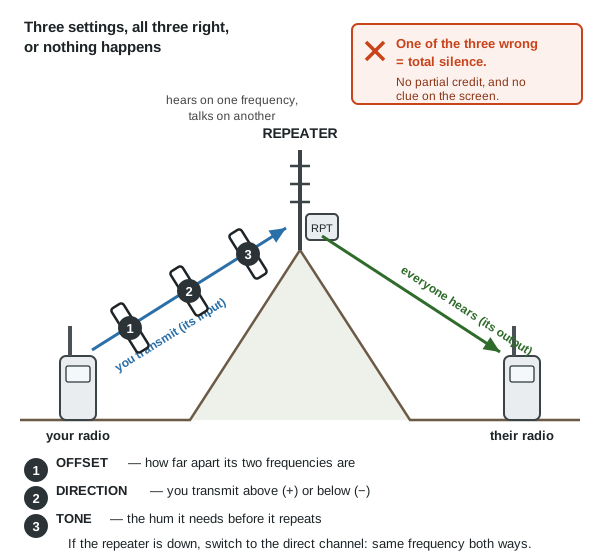 Offset, direction and tone: all three right, or the repeater never answers. There is no partial credit (a diagram drawn for this guide).
Talk-around turns a repeater channel into a direct one by using the repeater's output frequency both ways. It keeps two people standing together off the repeater, but switched on by mistake it means you cannot reach the repeater at all, and nothing on the screen says so (NIRSC, p. 34). If the repeater is down, go simplex: save the direct channel beside every repeater channel so you can switch without typing (Radio guide).
The valley's own numbers are already listed — the JCEC repeater with its offset and tone, the net times, and the no-licence Monday check-in channels — in the Radio guide's local section and on its printed card. Copy them straight onto the channel card in section 7 rather than writing them down twice, and check them against a current club list before you trust them.
5. Programming with a computer, while there is internet
Typing memory channels on a keypad takes an hour and goes wrong. A computer does it in ten minutes and leaves you a file you can copy to every radio in the house, back up and print. Do this now: it needs internet once, and never again.
CHIRP is the free program nearly everyone uses. It is free software under the GNU General Public License version 3, so it costs nothing and may be copied freely, and it comes from the project's own site, chirpmyradio.com. It runs on Windows 10 and later, macOS Big Sur and later, and Linux with Python 3, handles several hundred models including the cheap handhelds, and the project asks you to use the newest build, as that is the only one they maintain.
⚠️ CHIRP is not on this drive, and the library's download list cannot fetch it. The installer is a program, not a PDF or a ZIP, which is all the library downloads, and CHIRP's download site turns plain downloaders away. Save it by hand, now: download the installer from chirpmyradio.com and copy that file into
Southern-Oregon\Comms-Signals\Radio-Operatingbeside these books, with the date in its name. A program you did not save is a program you will not have.
The cable is a programming cable: USB at one end, the radio's own two-pin earphone-and- microphone plug at the other, with a chip inside that turns USB into the serial line the radio speaks. It is not a charging cable and not an audio cable. The usual problem is a counterfeit cable: cheap ones use copied chips, and Windows will often recognise the cable, install a driver and show a COM port — and then the program cannot talk to the radio at all, sometimes after working once (rule of thumb). Buy from the radio's maker or a known ham dealer, try another computer and a socket on the machine rather than a hub, and look up the driver version CHIRP's own site recommends. Test the cable while you still have internet.
The order of work:
- Install CHIRP, plug the cable in, and let the computer find it.
- Switch the radio on — battery charged — and push the plug fully into the radio.
- Read from the radio first (CHIRP calls it Download From Radio): choose make, model and port, and it copies what is in the radio onto the screen.
- Save that file at once, named for the radio and the date, before changing anything. It is your way back.
- Build your channel list in the table: a row per channel with receive frequency, transmit frequency or offset, tone, width, power and a short name. Copy a row and edit it rather than typing each one. ⚠️ Put in only frequencies you may use — "program your radio with authorized frequencies only" (NIRSC, p. 9), and see the law.
- Write it back (Upload To Radio), then check the radio itself: turn to each channel and listen.
- Copy the file to every radio in the house, so all hold the same channels with the same names and numbers. Mismatched radios are what fire crews re-clone to fix (same page).
- Keep three copies of the file — drive, computer, phone — and print the card (section 7) for each radio.
The words on your screen will not match this page exactly: "there is no one-size-fits-all solution due to differing radio designs" (DHS field guide, p. 20). The order is what matters.
6. Programming with no computer
No computer, no cable, or no software for your radio: the keypad can still do all of it. The exact presses are in your manual; the shape of the job is always this.
- Unlock the keypad deliberately, so nothing is half-changed from a pocket press (NIRSC, p. 33).
- Get into frequency mode, arrow on the line you are working with.
- Type the frequency you want to listen to, every digit, no decimal point.
- Set the width (narrow or wide) and the power.
- Set the tone you will transmit, if the channel needs one, and leave the receive tone off.
- For a repeater, set the offset size and the + or −, or type the transmit frequency as the channel's other half (section 4).
- Save it to a memory channel number through the menu's save item, writing that number on your card as you go.
- Switch to memory mode and prove it. Turn to the channel, listen, and where it is legal ask someone to answer a test call: "call someone before departing… be sure you get a response" (NIRSC, p. 39). A brief radio check is a permitted use even on the licence-free services (§95.931).
Do the whole list in one sitting, in the same order as your card, and lock the keypad when you finish. If a step will not take, you are in the wrong mode, the arrow is on the other line, or the frequency is outside what the radio was built for.
7. A printed channel card
Fill this in, print it, and tape a copy inside the radio's case. The Radio guide's frequency card already has the numbers that are the same everywhere — CB channel 9 and 19, the ham calling frequency, the weather-radio frequencies — so copy from it rather than writing them twice.
| Ch | What it is | Receive (MHz) | Transmit or offset | Tone (Hz) | N/W | Notes |
|---|---|---|---|---|---|---|
| 1 | House to barn, direct | 462.6125 | same | none | N | FRS ch 3, no licence, up to 2 W |
| 2 | Ham calling, direct | 146.520 | same | none | W | Listen here first; licence to talk |
| 3 | Local repeater | + offset | From the local repeater list | |||
| 4 | Weather | receive only | — | Never transmit | ||
| 5 | ||||||
| 6 | ||||||
| 7 | ||||||
| 8 |
The two worked rows are real: FRS channel 3 is 462.6125 MHz (§95.577) at up to 2 watts on channels 1–7 (§95.567) and needs no licence (§95.305); 146.520 MHz is the national 2 metre calling frequency, which needs a ham licence to transmit on.
Emergency offices use the same table. Their standard form, ICS 205, has exactly these columns — channel number, function, name, receive frequency with N or W, receive tone, transmit frequency with N or W, transmit tone (ICS 205, p. 21, instructions on p. 23) — so a filled-in ICS 205 handed to you in a real emergency tells you exactly what to put in the radio.
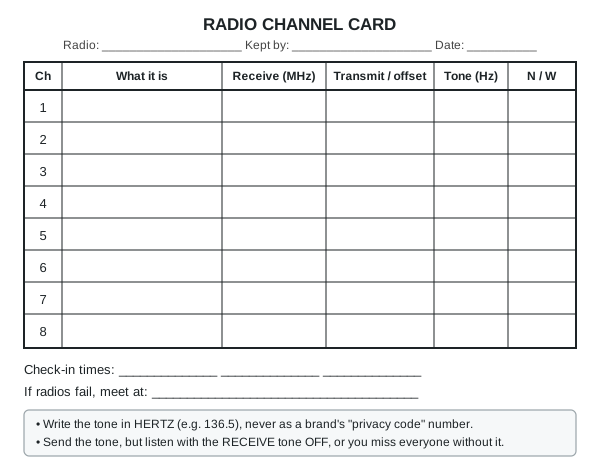 Print this, fill it in by hand, and keep a copy with every radio (a diagram drawn for this guide).
8. Other gear, briefly
A NOAA weather radio
A receiver that sits on one of the seven weather frequencies (162.400 to 162.550 MHz) and carries the National Weather Service day and night, repeating every 4 to 6 minutes (NOAA brochure, p. 2).
- Find your station: try all seven and keep the clearest. Coverage reaches about 40 miles, but "those in mountain valleys may experience little or no reception at considerably less than 40 miles" — so test it where you will keep it (p. 3).
- Switch the alert on. Forecasters send a signal ahead of a warning that wakes an alerting receiver and turns its volume up by itself (p. 2).
- Put your county code in. A SAME radio wakes only for the counties you program, each a six-digit code, following "the manufacturer's directions for programming your NWR SAME receiver" (same page). Put in your own county and the ones upwind.
- Batteries in, always. An alert radio on wall power alone is useless in the outage it was warning you about.
The weather-radio stations that reach the valley and Josephine County's SAME code are in the Radio guide's local section. Try each of them at the spot where the radio will live: NOAA warns that mountain valleys "may experience little or no reception at considerably less than 40 miles" (NOAA brochure, p. 3), and this valley is ringed by mountains. If none comes in indoors, try a window facing Medford, or an outside antenna.
A shortwave receiver
Listening only, so no licence and nothing you do can be heard (Radio guide).
- Tune slowly, by hand, noting what you find and the time in a notebook kept with the radio.
- Time of day decides everything: shortwave bounces off the ionosphere, which changes between day and night, so lower bands carry at night and higher ones by day (NEETS 10, p. 100). Listen at dusk and after dark for distant stations, and expect last night's loud station to be gone at noon. A near station can be silent while a far one is loud — the skip zone (p. 106) — which is normal, not a fault.
- A long wire helps more than a better radio: twenty or thirty feet of any wire clipped to the antenna socket and run out of a window transforms a pocket set (FM 24-18, p. 98). Bring it in during a thunderstorm.
- Mode matters: broadcasts are AM; ham and utility voice is usually SSB, unintelligible on an AM-only radio.
A CB
Forty channels at 27 MHz, no licence, a knob per function and nothing to program.
- Squelch and volume knobs, set as in section 1.
- Channel 9 is for emergencies and travellers only: it "may be used only for emergency communications or traveler assistance. It must not be used for any other purpose" (§95.931), and emergency traffic has priority on every channel (same rule). Channel 19 is the highway and trucker channel by long custom (Radio guide).
- ⚠️ Check the antenna match (SWR) on a newly fitted CB antenna, and never transmit with the antenna off or its cable damaged. A mismatched antenna sends power back down the cable, which "can ... cause circuit damage"; an SWR meter between radio and antenna is how you see it (FM 24-18, p. 56). Mount the antenna high and central, and set its length for the lowest reading (rule of thumb).
- ⚠️ No amplifiers on CB: an operator "must not use an external radio frequency power amplifier ... under any circumstances. There are no exceptions to this rule" (§95.939).
A scanner
A receiver that hunts through a list of channels, stops when one is busy and carries on when it goes quiet (NIRSC, p. 18). It cannot transmit at all, and it is the best way to learn what is happening around you. It can hear anything analogue in its range: the weather frequencies (NOAA brochure, p. 3), FRS, GMRS, MURS, CB, ham, marine, aircraft and many fire and public-works channels. It cannot hear a digital system unless it was built for that system, and an encrypted channel is closed to every scanner — many agencies have moved to digital, so find out what the services near you use before buying one (rule of thumb). Keep the list short: a scanner loaded with fifty busy channels sits on the first one; three to five is a working list (p. 19).
FRS and GMRS bubble-pack radios
- The channel numbers are fixed by rule, so channel 3 on one brand is channel 3 on another: 22 channels, each a set frequency (§95.577). Agree a number with the neighbours and it works across brands.
- The "privacy code" is the trap. It is a tone, not privacy (section 3), and the code numbers are not standard between brands, so two radios on channel 3 with "code 5" may still not hear each other. Set every radio's code to 0 or off and they will all work together (rule of thumb).
- Power is small and fixed: half a watt on channels 8 to 14, up to 2 watts on the rest (§95.567). Height is the only thing that will help.
- Charging: most come with a cradle, and many take AA cells instead. Keep a set of AAs with them, because a cradle is useless in an outage (rule of thumb). FRS needs no licence; GMRS does (section 10).
9. Looking after radios
- Batteries are the whole game. One in the radio, one charged on the shelf (NIRSC, p. 39), and an alkaline or AA tray for the handheld as a last resort (ARRL manual, p. 12).
- Store lithium batteries part-charged and cool — about 20 to 40 % of full, at room temperature: "storage while fully charged or in elevated temperatures should be avoided as this will put stress on the cell, reduce battery life" (Li-ion overview, pp. 7–8). A pack left flat for months may never charge again (rule of thumb).
- Charging from sun or vehicle: a small panel with a USB output keeps handhelds going indefinitely, and a 12 volt battery runs a base set — see the Off-grid power guide and Generators, cars and backfeed. ⚠️ Check the voltage and which wire is positive first: "polarity conventions are not always followed" (ARRL manual, p. 76).
- Keep it clean and dry and handle it gently — the Army's whole maintenance advice in one line (FM 24-18, p. 113). A freezer bag with the antenna through a taped hole keeps rain off a handheld all day (rule of thumb). Caps or tape on unused sockets, clean antenna threads, and never pull a cable out by the wire: a corroded connector is the commonest fault in stored gear (rule of thumb).
- What kills radios: transmitting with no antenna; water inside; heat, such as a dashboard in summer; a flat battery left flat; and the wrong cable in the wrong socket, which can cause "serious electrical damage to the equipment and, in some cases, injury to the operator" (FM 24-18, p. 111).
- Keep one spare radio in a shielded box, unplugged, antenna off, its battery beside it part-charged — the cheapest insurance against both an EMP and a dropped radio (EMP guide).
- Use it. A radio worked once a week is a radio that works.
Running it on AA cells when the pack dies
Every rechargeable pack dies eventually: a few hundred charges, or a few years sitting flat. When yours will not hold a charge and no replacement is coming, the radio itself is still fine. It wants about 7.4 volts at the two contacts the pack slid onto.
- The clean way: a battery case. Makers sell a 6 × AA case shaped like the pack — it clips on exactly where the pack went, no cutting, about $10 to $18. Keep one in the can with the radio. AA cells store for a decade; a lithium pack does not.
- ⚠️ With alkaline AAs, use five cells and the dummy. Six alkalines make 9 volts, which is enough to receive but too much for the radio to transmit. The case comes with a dummy cell: five alkalines plus the dummy gives 7.5 volts and everything works. Six rechargeable NiMH cells make 7.2 volts and need no dummy. (From the makers' own instructions for these cases.)
- AAA cells work but barely last. Six AAAs make the same voltage as six AAs and will run the radio, but they hold roughly a quarter as much, so expect an hour or two of light use rather than a day. Use them to get a message out, not to live on.
- No case? A battery eliminator. The same sellers make a dummy pack with a cigarette-lighter plug on a lead, so the radio runs off a 12 volt battery or a solar setup through the Vault's 12 volt supply. That is the one to have if the radio is going to sit in one place.
- Jerry-rigging it yourself (rule of thumb, and a last resort): a six-cell AA holder, two short wires, and a careful look at which contact on the radio is +. Get it backwards and you may kill the radio. ⚠️ Work out the polarity with a multimeter on the old pack first, mark it, and solder nothing to the radio itself — tape the wires to the contacts, or clip them to the old pack's shell with the cells taken out. Never put a 12 volt battery straight on a 7.4 volt radio.
- The cells themselves — which chemistry keeps longest, how to store them, and reviving a pack that has gone flat: the Batteries guide.
10. The law, plainly
Nothing here is legal advice, and the rules themselves are now on the drive: 47 CFR Part 95 for CB, FRS, GMRS and MURS, and Part 97 for ham.
- Listening needs no licence of any kind. A receiver, scanner or shortwave set transmits nothing. (A few states have their own rules about carrying a scanner in a vehicle; check your state's.)
- CB, FRS and MURS need no licence: the rules authorise anyone eligible to operate these stations "without individual licenses" (§95.305). MURS is five VHF channels at up to 2 watts (§95.2763, §95.2767).
- GMRS needs a licence, but no test. "A valid individual license is required to operate a GMRS station" (§95.1705). You must be 18, it lasts ten years, and it covers your immediate family — spouse, children, parents, grandparents, brothers and sisters, aunts, uncles, nieces, nephews and in-laws (§95.1705(a), (c), (e)). A GMRS station gives its call sign at the end of a conversation and at least every 15 minutes during a long one (§95.1751); the licence-free services need no call sign at all (§95.351).
- Ham needs a licence and a test, and the test is easy. The Technician licence is one written exam, Element 2: 35 questions, 26 right to pass (§97.501; §97.503), and the question pool is public, so you can study the exact questions. Hams send their call sign at the end of each contact and at least every 10 minutes (§97.119). Get licensed while it is easy (Radio guide).
- In a real emergency the rules step aside. No provision of the ham rules "prevents the use by an amateur station of any means of radiocommunication at its disposal" for "the immediate safety of human life and immediate protection of property when normal communication systems are not available" (§97.403), and a station in distress may use "any means at its disposal to attract attention, make known its condition and location, and obtain assistance" (§97.405). On the licence-free services you may use full power for emergency messages (§95.367), a GMRS licensee may let anyone use their station "if necessary to communicate an emergency message" (§95.1705(c)(3)), and emergency traffic has priority on every CB channel (§95.931). The rules mean it narrowly, though: an emergency message concerns "the immediate safety of life or protection of property" (§95.303) — real danger, now, not convenience and not practice.
- ☠️ Never send a false distress call. It is flatly prohibited (§95.353) and it sends people into danger for nothing.
- A cheap handheld is often not certified for the service you want it for. Every radio in the personal radio services must be a certified type for that service, and "use of a transmitter that is not FCC-certified voids the user's authority to operate that station" (§95.335). Since December 2017 the FCC no longer certifies a handheld under both GMRS and FRS (§95.1761(d), (e)), and a radio certified only for ham use — or not certified at all — is not legal on FRS, GMRS, MURS or CB even though it can tune those frequencies. Check what your radio's label and manual say it is certified for, and keep those channels out of its memories if it is not.
- The ordinary rules still apply: nothing against the law, no advertising, no obscene language, no deliberate interference, no false or deceptive messages (§95.333); transmit no longer than you need (§95.357); and the channels belong to nobody — they are shared, and you must cooperate to stay out of each other's way (§95.359). Transmitting on a service you are not authorised for is itself a violation (§95.363), so find out what a frequency is by listening.
11. If this goes wrong
| Problem | Try this |
|---|---|
| No sound at all | Volume up; open the squelch or hold the monitor button until you hear hiss, set the volume on the hiss, then close the squelch just past it (NIRSC, p. 25). Check no receive tone is set, which silences everyone without it (DHS field guide, p. 20) |
| Hiss and nothing else | Squelch too far open, or an empty channel. Close it until the hiss stops; check you are on the agreed channel |
| They hear me, I can't hear them | A receive tone set on your radio; narrow against wide; squelch too tight; or they are too far for your power |
| I hear them, they can't hear me | The arrow is on the other display line; power set low; antenna loose, missing or held flat; battery nearly flat — radios transmit badly long before they stop receiving (rule of thumb) |
| Nothing happens on the repeater | One of the three: offset, direction, tone (section 4). Check talk-around is not switched on, which shows nothing on the screen (NIRSC, p. 34). Then try the direct channel |
| It transmits on the wrong channel | Dual watch transmits on the line the arrow is on, not the one you heard: move the arrow (p. 18) |
| I sound odd to one person only | Bandwidth mismatch (ICS 205 instructions, p. 23) |
| First word cut off, or cut off mid-sentence | Press, pause, then speak; and unkey every minute or two, say "break", carry on (NIRSC, pp. 40–41) |
| Short battery life | Scanning or dual watch on too many channels, high power, the backlight and the beeps. Scan no more than three channels (p. 19) |
| Buzz, hum or constant chatter | Power lines or fluorescent lights opening the squelch (p. 24); move away from your generator and charger (FM 24-18, p. 103) |
| The keypad beeps and does nothing | It is locked: press and hold the lock key (p. 33) |
| The computer can't see the radio | The cable: wrong port, plug not pushed fully in, a hub instead of a socket on the machine, or a counterfeit chip. Try another computer before blaming the radio (rule of thumb) |
| Nobody answers at all | Get higher and clear of buildings and leafy trees, hold the radio upright, try a repeater (Radio guide) |
⚠️ Old advice in the library to ignore
| Book says | Do this instead |
|---|---|
| Let a radio set "warm up" before transmitting, as some can be damaged without it (FM 24-18, p. 112) | That was vacuum-tube equipment; any radio you will own switches on and works (rule of thumb). The rest of that page — antenna attached, connectors clean, controls checked — still holds |
| The DHS field guide's FRS page: 14 channels at half a watt (p. 101) | That 2016 edition pre-dates the rule change. FRS is now 22 channels, up to 2 watts on channels 1–7 and 15–22 (§95.577; §95.567). Its tone tables on p. 68 have not changed |
| Radio plans list a tone on both transmit and receive (NIRSC, p. 22) | Right on a closed system where everyone gets the same programming. On a shared channel, send the tone but listen with the receive tone off, or you will not hear the strangers sharing it (DHS field guide, p. 20) |
| A radio's box says its codes give a "private" channel | They give a quiet speaker. Anyone listening without a code hears you (section 3) |
Pictures & diagrams
🖼️ = drawings in the books on this drive; the other links are photos in the offline Wikipedia.
- Two real handhelds with every control named — NIRSC, p. 13; p. 20
- Setting the squelch knob, step by step — NIRSC, p. 25; the circuit inside, NEETS 17, p. 72
- A simplex channel and a repeater channel on a real radio plan — NIRSC, p. 5; p. 7
- A repeater's two frequencies, and what talk-around does to them — NIRSC, p. 6; p. 34
- The 32 CTCSS tones and the DCS codes — DHS field guide, p. 68; p. 69
- The blank ICS 205 radio plan, and how each column is filled in — ICS Forms Booklet, p. 21; p. 23
- Why a mismatched antenna matters, and the meter that shows it — FM 24-18, p. 56
- A long wire for shortwave listening — FM 24-18, p. 98; good and poor places to put a radio, p. 108
- Photos: Walkie-talkie, Push-to-talk, Squelch, Continuous Tone-Coded Squelch System, Repeater, Whip antenna, Standing wave ratio
Related guides
- Emergency radio guide — which radio to use, licences, antennas, range, nets and how to call for help
- Mesh radio guide — Meshtastic: text messages radio to radio, and the only private option here
- Signals and Morse guide — the neighborhood OK/HELP plan, message forms, and signalling with no radio
- Off-grid power guide — keeping radios and batteries charged from the sun or a vehicle
- EMP guide — a shielded box for the spare radio, and what to do after an event
- Navigation and weather guide — reading the sky when the weather radio is silent
- ARK Vault guide — the Vault's own radios and how they are powered
- Batteries: Keeping Them, Charging Them, Reviving Them — battery care, charging with no charger, and testing a cell